Create a Training Course
To create a new Training Course follow the steps below:
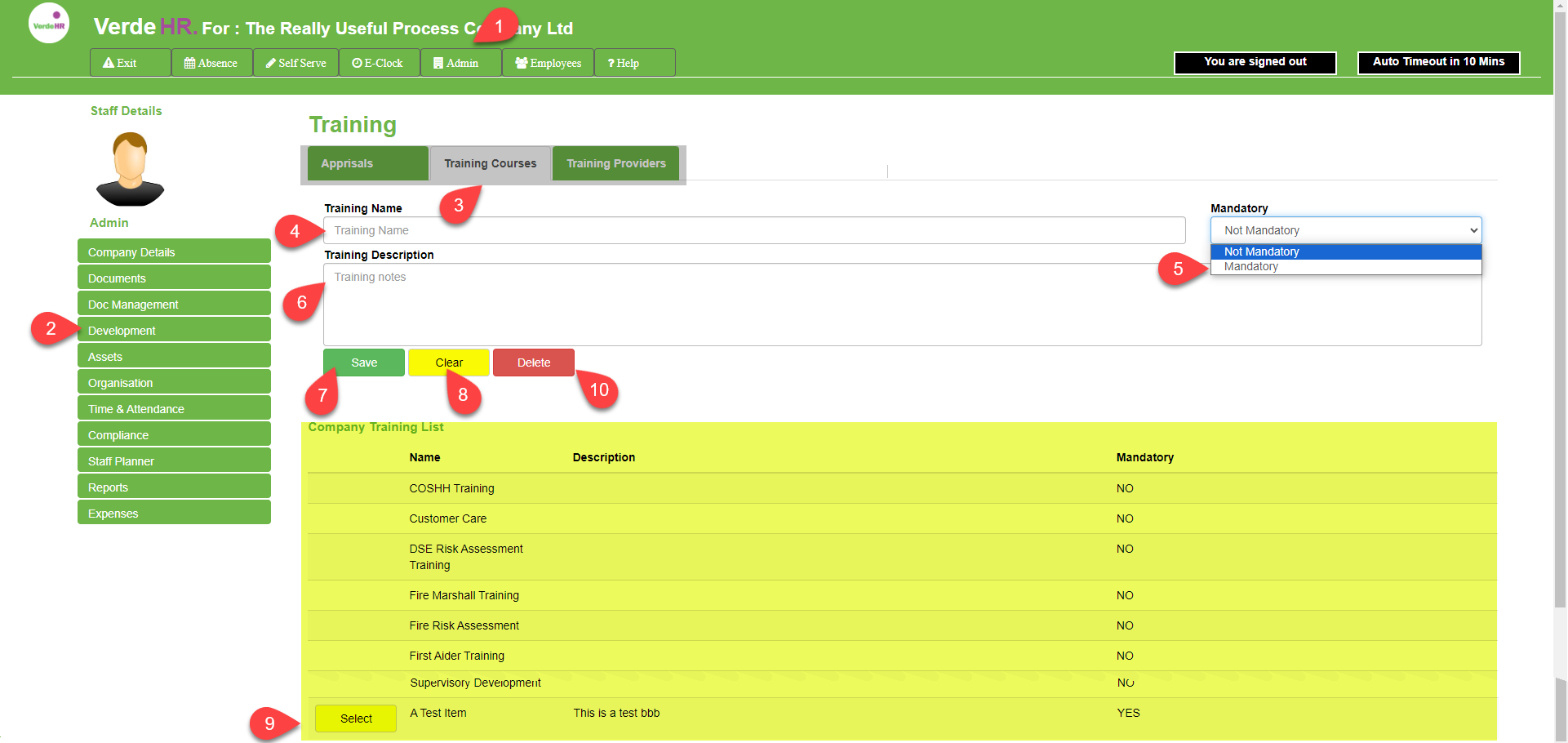
Write the name in the Training Course in the “Training Name” box (See 4 in the screenshot below)
To include the training course on the Training Matrix Report, select Mandatory from the “Mandatory” box (See 5 in the screenshot below)
Optional, You can write a description in the Training Course Description” box (See 6 in the screenshot below)
Click Save (See 7 in the screenshot below) to save the newly created Training Course
To clear the form to create a new Training Course click on the Clear button (See 8 in the screenshot below)
To open and edit an existing Training Course select the category from the list (See the highlighted section in yellow in the screenshot below) and select the Edit button (See 9 in the screenshot below).
To delete an Training Course select the category from the list (See the highlighted section X in the screenshot below) and select the Edit button (See 10 in the screenshot below) when the expenses category is open, you can delete it by pressing the Delete button (See X in the screenshot below).
Screen Shot